Index | Archives | Atom Feed | RSS Feed

Writing Volume Control UIs is Hard

Writing modern volume control UIs (i.e. 'mixer tools') is much harder to get right than it might appear at first. Because that is the way it is I've put together a rough guide what to keep in mind when writing them for PulseAudio. Originally just intended to be a bit of help for the gnome-volume-control guys I believe this could be an interesting read for other people as well.

It touches a lot of topics: volumes in general, how to present them, what to present, base volumes, flat volumes, what to do about multichannel volumes, controlling clients, controlling cards, handling default devices, saving/restoring volumes/devices, sound event sliders, how to monitor PCM and more.

So make sure to give it at least a quick peek! If you plan to write a volume control for ncurses or KDE (hint, hint!) even more so, it's a must read.

Maybe this might also help illustrating why I think that abstracting volume control interfaces inside of abstraction layers such as Phonon or GStreamer is doomed to fail, and just not even worth the try.

And now, without further ado I give you 'Writing Volume Control UIs'.


Oh Nine Fifteen

Last week I've released a test version for the upcoming 0.9.15 release of PulseAudio. It's going to be a major one, so here's a little overview what's new from the user's perspective.

Flat Volumes

Based on code originally contributed by Marc-André Lureau we now support Flat Volumes. The idea behind flat volumes has been inspired by how Windows Vista handles volume control: instead of maintaining one volume control per application stream plus one device volume we instead fix the device volume automatically to the "loudest" application stream volume. Sounds confusing? Actually it's right the contrary, it feels pretty natural and easy to use and brings us a big step forward to reduce a bit the number of volume sliders in the entire audio pipeline from the application to what you hear.

The flat volumes logic only applies to devices where we know the actual multiplication factor of the hardware volume slider. That's most devices supported by the ALSA kernel drivers except for a few older devices and some cheap USB hardware that exports invalid dB information.

On-the-fly Reconfiguration of Devices (aka "S/PDIF Support")

PulseAudio will now automatically probe all possible combinations of configurations how to use your sound card for playback and capturing and then allow on-the-fly switching of the configuration. What does that mean? Basically you may now switch beetween "Analog Stereo", "Digital S/PDIF Stereo", "Analog Surround 5.1" (... and so on) on-the-fly without having to reconfigure PA on the configuration file level or even having to stop your streams. This fixes a couple of issues PA had previously, including proper SPDIF support, and per-device configuration of the channel map of devices.

Unfortunately there is no UI for this yet, and hence you need to use pactl/pacmd on the command line to switch between the profiles. Typing list-cards in pacmd will tell you which profiles your card supports.

In a later PA version this functionality will be extended to also allow input connector switching (i.e. microphone vs. line-in) and output connector switching (i.e. internal speakers vs. line-out) on-the-fly.

Native support for 24bit samples

PA now supports 24bit packed samples as well as 24bit stored in the LSBs of 32bit integers natively. Previously these formats were always converted into 32bit MSB samples.

Airport Express Support

Colin Guthrie contributed native Airport Express support. This will make the RAOP audio output of ApEx routers appear like local sound devices (unfortunately sound devices with a very long latency), i.e. any application connecting to PulseAudio can output audio to ApEx devices in a similar way to how iTunes can do it on MacOSX.

Before you ask: it is unlikely that we will ever make PulseAudio be able to act as an ApEx compatible device that takes connections from iTunes (i.e. becoming a RAOP server instead of just an RAOP client). Apple has an unfriendly attitude of dongling their devices to their applications: normally iTunes has to cryptographically authenticate itself to the device and the device to iTunes. iTunes' key has been recovered by the infamous Jon Lech Johansen, but the device key is still unknown. Without that key it is not realistically possible to disguise PA as an ApEx.

Other stuff

There have been some extensive changes to natively support Bluetooth audio devices well by directly accessing BlueZ. This code was originally contributed by the GSoC student João Paulo Rechi Vita. Initially, 0.9.15 was intended to become the version were BT audio just works. Unfortunately the kernel is not really up to that yet, and I am not sure everything will be in place so that 0.9.15 will ship with well working BT support.

There have been a lot of internal changes and API additions. Most of these however are not visible to the user.


Pascal,

replacing integral parts of a system is always a bit of a dilemma. If we replace it only after all the other software/drivers that interface with it is known to work well with it then nobody will bother doing all that compatbility work since they can say "Nobody uses it yet, so why should I bother?" -- and hence the change can never take place.

If we replace it before everything works perfectly well with it, then folks will complain: "Oh my god, it doesn't work with my software/drivers, you suck!" -- like you just did (though in more polite words).

Hence regardless which way we do it we will do it the wrong way. Biting the bullet and doing the change is however still the better, the only path to improvement. With the limited amount of manpower we have pushing things out knowing that there is some software/drivers that don't work well with it is our only option -- especially if the software in question is unfixable by us since it is closed source.

Hence, if we'd do as you wish and not make the distributions adopt PulseAudio right now we can forget about fixing audio on Linux entirely and it will stagnate forever.

As mentioned by J5 this was the same story with D-Bus, HAL, with udev, and other stuff.

And again, folks may claim that PulseAudio is very buggy. While it certainly has bugs, like every software has, most of the issues reported are not things we can or should fix/work-around in PulseAudio, but that are in other layers of the system. In ALSA, in the drivers, in the client applications. However only PA makes them become visible since it depends on a lot more functionality to work properly than any other program before. And quite frankly we use a lot of stuff exactly nobody has used before and that of course was broken due that (in ALSA as one example).

Having said all this. Just pointing to other folks to blame doesn't really solve the problem. I did a lot of testing on different sound chips, making sure PulseAudio works fine on them. Of course it's a limited testing set (six cards right now to be exact, a seventh model currently being sent to me by my employer, Red Hat.). The list of cards that are currently known to be problematic are listed in our Wiki.

I am not saying that the points you make are rubbish. However, please see the big picture before getting vocal about it.


India, Again

Right after my trip to Brazil in November I flew to Bangalore for FOSS.in 2008. It was one amazing conference! After the bold changes they had announced I feared they might be a bit too ... bold. But they were not. FOSS.in worked out very well, it was a great success, and it was good to see a lot of familiar faces again. (Which reminds me: Hey, the four of you from the PulseAudio Workout, could you please drop me a line? I forgot to put down your email addresses.)

After FOSS.in I flew up to Rajasthan for a much too short trip through this marvelous state:

India   India   India   India   India   India  

India   India   India   India   India   India  

India   India   India   India   India   India  

India   India   India   India   India   India   India   India  

India   India   India   India   India   India   India   India  

India   India   India   India   India   India   India   India  

India   India   India   India   India   India   India   India  

India   India   India   India   India   India   India   India  

India   India   India   India   India   India   India  

India   India   India   India   India   India  

Panorama

Panorama

Panorama

Panorama

Panorama

Panorama

That's Pushkar, Jaipur, Fatehpur Sikri and the Taj Mahal (the real one, not the Hotel they bombed).


Brazil

In November I spent three weeks in Brazil, the country where I grew up two decades ago. Surprisingly little had changed since then. Except maybe that this time I had an DSLR:

Brazil   Brazil   Brazil   Brazil  

Brazil   Brazil   Brazil   Brazil  

Brazil   Brazil   Brazil   Brazil  

Brazil   Brazil   Brazil   Brazil   Brazil   Brazil  

Brazil   Brazil   Brazil   Brazil   Brazil   Brazil  

Brazil   Brazil   Brazil   Brazil   Brazil   Brazil  

That's Rio de Janeiro and the old colonial towns of Ouro Preto, Mariana, São João del Rey, Tiradentes, Congonhas do Campo, Paraty in Minas Gerais and Rio State.

Panorama

Panorama

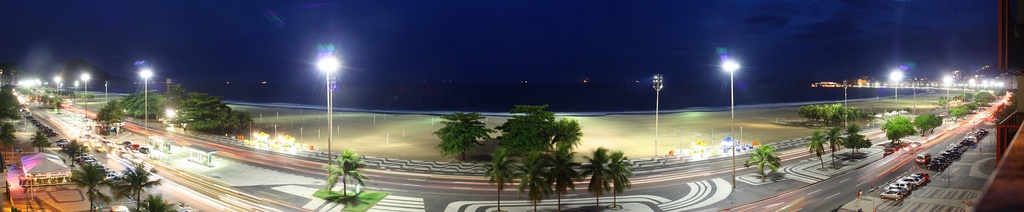
Once again Ouro Preto, and Copacabana Beach at night.


Automatic Backtrace Generation

Ubuntu has Apport. Fedora has nothing. That sucks big time.

Here's the result of a few minutes of hacking up something similar to Apport based on the awesome (and much underused) Frysk debugging tool kit. It doesn't post any backtraces on any Internet servers and has no fancy UI -- but it automatically dumps a stacktrace of every crashing process on the system to syslog and stores all kinds of data in /tmp/core.*/ for later inspection.

#!/bin/bash
set -e
export PATH=/sbin:/bin:/usr/sbin:/usr/bin
DIR="/tmp/core.$1.$2"
umask 077
mkdir "$DIR"
cat > "$DIR/core"
exec &> "$DIR/dump.log"
set +e
echo "$1" > "$DIR/pid"
echo "$2" > "$DIR/timestamp"
echo "$3" > "$DIR/uid"
echo "$4" > "$DIR/gid"
echo "$5" > "$DIR/signal"
echo "$6" > "$DIR/hostname"
set -x
fauxv "$DIR/core" > "$DIR/auxv"
fexe "$DIR/core" > "$DIR/exe"
fmaps "$DIR/core" > "$DIR/maps"
PKGS=`/usr/bin/fdebuginfo "$DIR/core" | grep "\-\-\-" | cut -d ' ' -f 1 | sort | uniq | grep '^/'| xargs rpm -qf | sort | uniq`
[ "x$PKGS" != x ] && debuginfo-install -y $PKGS
fstack -rich "$DIR/core" > "$DIR/fstack"
set +x
(
	echo "Application `cat "$DIR/exe"` (pid=$1,uid=$3,gid=$4) crashed with signal $5."
	echo "Stack trace follows:"
	cat "$DIR/fstack"
	echo "Auxiliary vector:"
	cat "$DIR/auxv"
	echo "Maps:"
	cat "$DIR/maps"
	echo "For details check $DIR"
) | logger -p local6.info -t "frysk-core-dump-$1"

Copy that into a file $SOMEWHERE/frysk-core-dump. Then do a chmod +x $SOMEWHERE/frysk-core-dump and a chown root:root $SOMEWHERE/frysk-core-dump. Now, tell the kernel that core dumps should be handed to this script:

# echo "|$SOMEWHERE/frysk-core-dump %p %t %u %g %s %h" > /proc/sys/kernel/core_pattern

Finally, increase RLIMIT_CORE to actually enable core dumps. ulimit -c unlimited is a good idea. This will enable them only for your shell and everything it spawns. In /etc/security/limits.conf you can enable them for all users. I haven't found out yet how to enable them globally in Fedora though, i.e. for every single process that is started after boot including system daemons.

You can test this with running sleep 4711 and then dumping core with C-\. The stacktrace should appear right-away in /var/log/messages.

This script will automatically try to install the debugging symbols for the crashing application via yum. In some cases it hence might take a while until the backtrace appears in syslog.

Don't forget to install Frysk before trying this script!

You can't believe how useful this script is. Something crashed and the backtrace is already waiting for you! It's a bugfixer's wet dream.

I am a bit surprised though that noone else came up with this before me. Or maybe I am just too dumb to use Google properly?


People of the Free World [1]!

GNOME 2.24 supports XDG sound themes. Unfortunately however right now there is only a single sound theme in existence: the sound-theme-freedesktop -- which is pretty basic.

Help us change this! There are many web sites like art.gnome.org which provide a large selection of graphical themes for Gtk+, Metacity, icon sets and so on. We want to see a similarly large selection of sound themes available! And we'd like you to contribute to this!

How do you prepare sound themes? Read the XDG Sound Theming and the XDG Sound Naming specifications. Start with basing your work on the aforementioned sound-theme-freedesktop. And then just go ahead!

Please note that only subset of the sounds listed in the Sound Naming Specification is currently hooked up properly -- i.e. generated when "input feedback" is enabled or triggered by applications. Nonetheless it makes sense to include them in your theme, because eventually they will be hooked up.

When you put a theme together, make sure that you only select sounds that have a sensible Free Software license -- or if you have produced them yourself you pick a good license yourself. GPLv2+, LGPLv2+, CC-BY-SA 3.0 and CC-BY 3.0 are good choices.

Not everyone is as lucky as Richard Hughes and has a mom who is practically an endless source of special effect sounds. If your mom sucks then don't despair! The OLPC team has compiled a huge set of Free sounds that is waiting to be made an XDG sound theme. I am eagerly looking forward to your sound themes that make use of "The Berklee Sampling Archive - Volume 13 - synthesizer - fx (126 samples) spaceships, lasers, explosions, machineguns, glisses" to start a war in space each time you click a button on your screen![1]

Footnotes

[1] Free as in free desktops that is.

[2] OK, to be honest I am not actually that eagerly looking forward to that. Spacewar-at-your-fingertips is pretty lame in comparison to a theme called "Richard's Mom"[3].

[3] You have no idea what all those Hughsie's-Mom-jokes are about? Then listen to the sound files that are shipped with gnome-power-manager!


Berliners!

Berliners, you might want to attend this rally! It's tomorrow (hmm, or actually today considering it's already past midnight), October 11th 2 pm, Alexanderplatz.


Responses to my Audio API Guide

My Audio API guide got quite a few responses.

The Good

Takashi likes it. And so does David. Which is great because both are key people in the Linux multimedia community.

It made it to LWN. I sincerely and humbly hope this is not going to stay the only news site picking this up. ;-)

The safe ALSA part of the recommendations will most likely be added to the ALSA documentation soon. The GNOME-relevent part I will be adding to the GNOME platform overview.

The Bad

Aaron basically likes it, although he appears disappointed that KDE's and Qt's Phonon wasn't mentioned more positively. Aaron is very fair in his criticism. Nonetheless I don't think it is valid. My guide is not a list of alternatives. It's a list of recommendations. My recommendations. I do believe that my recommendations very much match the mainstream of the opinions of the key people in Linux multimedia and desktop audio. Of course I don't nearly know everyone of the key hackers in Linux multimedia. But I do know most of those who are actively interested in collaboration, whose projects have a lot mindshare and who attend the conferences that matter for Linux desktop audio.

Also see Christian's comments on Aaron's post.

The Ugly

It wasn't my intention to start another GNOME-vs.-KDE flamefest. Unfortunately a lot of people took this as great opportunity to troll at the various blog comment forums. I guess it is inevitable that some of those whose favourite software is not listed on a recommendation guide like this start to clamour about that. It's a pity not everyone who thinks I am treating KDE unfairly criticises that as fairly and reasonable as Aaron. Anyway, I humbly take this as a sign that people do consider this guide to be relevant and much needed. ;-)


Everybody Loves Pretty Graphics

As kind of a followup to my Guide to Linux Sound APIs here're some pretty graphics I just drew. (At least "pretty" to the degree of my limited drawing abilities). It's a block diagram depicting the Linux audio stack. A lot of people already drew something similar, and often enough the result was horribly complicated and -- in its conclusion disappointing. So, here's my try:

Linux Audio Stack

The components interface each other across the horizontal lines. The vertical lines seperate unrelated components. The drawing only includes modern, supported APIs and systems as described in the aforementioned blog article. It (hopefully) shows that things in the Linux audio world are not all that bad at all and we have workable answers for most questions without too much complexity, although they might not entirely make everyone overly happy.

In an outburst of bias I completely ommited KDE-specific technologies from this drawing. I guess even if I would have included them it'd be called biased anyway, so why bother? Also, they would have distracted the reader and complicated the drawing considerably due to KDE's affection for pluggable backends. So: if you care about KDE, please ignore this diagram.

© Lennart Poettering. Built using Pelican. Theme by Giulio Fidente on github. .